
Risk settings matter more than any engine tweak. So they sit in front of everything.
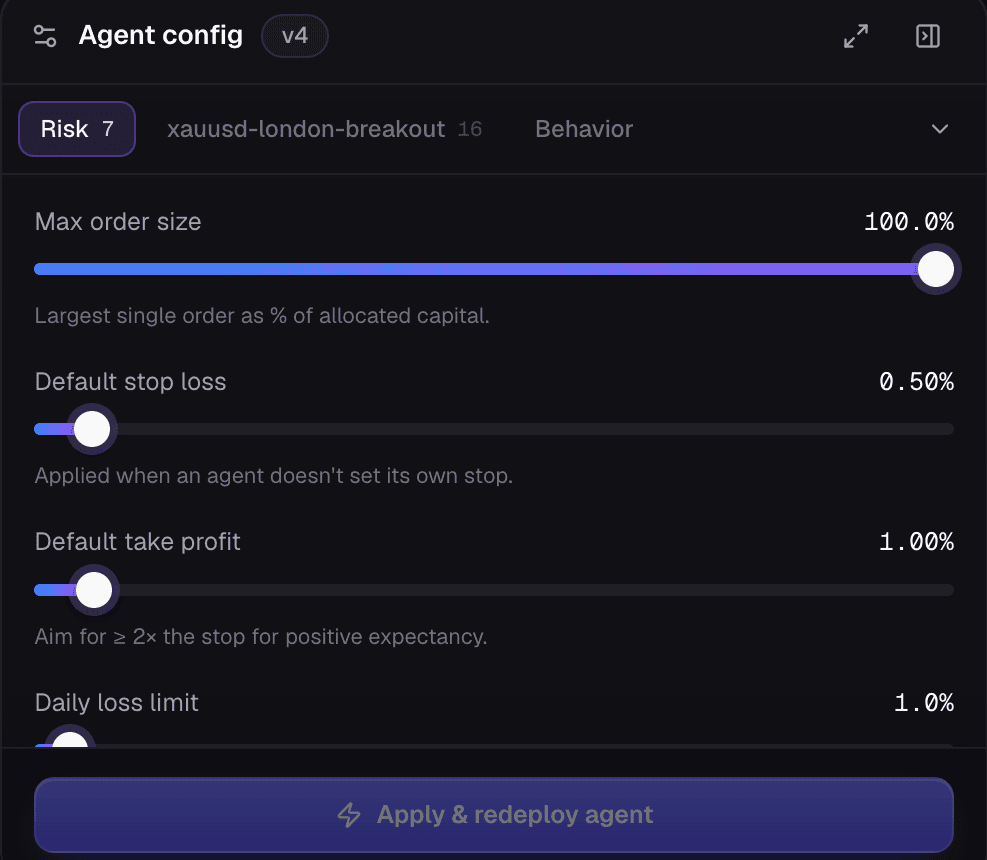
Sixteen documented risk settings with defaults, a hard risk budget that stops a bot for good, daily loss limits, cooldowns, a fat-finger guard, and on MT5 sizing from the loss at your stop. Every blocked entry is explained in the trace, with the setting to change.
Try it free for 7 daysDocumented in the Learn Center: position-sizing-and-risk
Why it matters
A bot that cannot break your rules is a bot you can sleep next to.
Risk per trade, done for you
On MT5, set a percentage and every entry opens exactly the lots whose stop loses that share of the account: lots = account × risk % ÷ (stop distance × contract size). Up to 10%.
A daily loss limit and a hard budget
Daily Loss Limit stops new entries for the rest of the UTC day once closed losses reach your percentage. Risk budget is a hard stop: once reached, the bot opens no more trades until you reset it. Closes always work.
Adaptive de-risking
Sizes shrink as the budget is used up: full size above 75% remaining, then 60%, 30% and 15% of normal. Reach your Goal and sizes halve.
Guards that explain themselves
Daily loss limit, position cap, cooldown after a fill, cooldown after a loss, price sanity and minimum size. A blocked entry shows Executor skipped order and the exact reason.
How it works
Step by step
- 01
Start from a preset
Conservative: 1 to 2% max order, 1 to 2 positions, 2% daily limit, risk budget 5% of capital. Balanced and aggressive presets go up from there. Agent-Managed Limits can propose a full set for you to review and save.
- 02
Pick a sizing method
Max order size as a percentage of balance, capped by Capital. On MT5, Fixed lots or Risk per trade, with the symbol's minimum, maximum, lot step and contract size shown as you type.
- 03
Set the stops
The execution agent's prices, then the engine's, then the bot's defaults. The trade's pipeline view shows which source was used. On MT5, Bybit futures and Deriv multipliers the stop lives at the venue.
- 04
Let the guards run
Risk changes apply immediately. A misbehaving agent cannot size above Max Order Size; agents may ask for less, never more.
In numbers
What the product actually does
- 16
- Documented risk settings, each with its default
- 5%
- Default max order size and default daily loss limit
- 3
- Default platform max open positions
- 10 min
- Default cooldown after a losing trade
- 10%
- Price sanity bound: orders further from the last price are blocked
- 0
- Guards that block a close. Closing is never blocked
Plainly
What it will not do
- —The daily loss limit counts closed losses on the UTC day and does not close open positions. Spread, commission, slippage and gaps come on top of the risk you set.
- —The shipped default stop loss and take profit are both 0.2% of entry, which is tight. Most strategies should set their own.
- —Risk per trade is MT5 only, for symbols whose profit is paid in the account currency, and not combined with fixed lots.
Works with
Related features
- 04Paper to livePaper trading runs your bot on live market prices with a simulated balance. It catches what a backtest cannot: how signals behave in real time, data gaps, sizing on a real balance, how often agents veto. Going live is the same bot, the same settings, a typed confirmation.
- 06Pipeline agentsPipeline agents are AI reviewers attached to a bot. Each is a short Markdown file: settings at the top, instructions in plain language. They read each signal with the market context you allow and answer with a verdict: approve, veto, size it, set the stop and target. The engine owns direction; agents cannot turn a buy into a sell.
- 13MetaTrader 5Connect a MetaTrader 5 account from any broker with a login, server and trading password. Bots trade it around the clock; you do not need MT5 open. Whatever your broker lists, from forex, metals and indices to Deriv's synthetic indices, the dashboard can trade. Stops live at the broker. Closes made at the broker are booked within about a minute.
Your next idea deserves a test, not a hope.
Deploy your Agent Dashboard, start from a template engine, and have a paper bot running in about fifteen minutes. 7 days free, on every plan.
Command Palette
Search for a command to run...